BallQuest

For coaches

Who played, how long, and where?

The question every parent asks on the way home, and the one no coach can answer from memory by round nine. BallQuest counts it while the match is being played — on the phone already in your hand, with no club licence and nothing to install.

The touchline

Run the match from the sideline

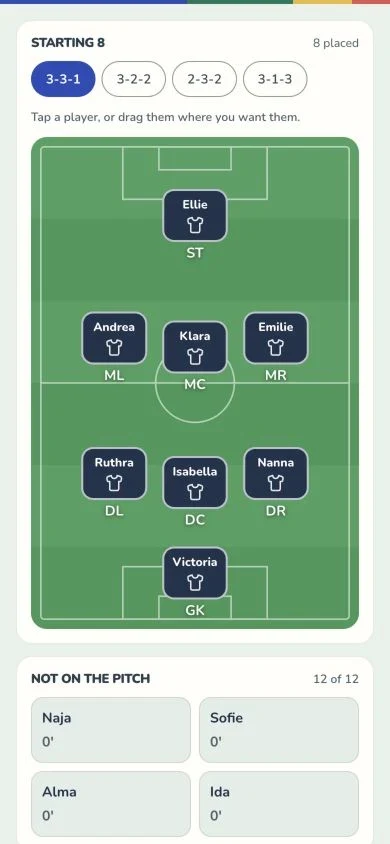
The lineup is a pitch. Tap a player, or drag her where you want her, and the swap is done — no menus, no list of names to scroll while a match is going on in front of you.

The clock runs per half, goals for and against are one tap, and every player’s minutes tick up as they stand there. The bench sorts itself fewest minutes first, so the next substitution is the one already at the top.

The BallQuest touchline console on a phone: a running match clock, the score, and the starting eleven on a pitch with the minutes each player has on the ball.
One player

Tap a name, and the row becomes a season

Minutes, matches played, matches started, goals, assists — and the one a parent actually asks about: how often she was named in the squad and never got on.

Then goal involvement per 60 minutes on the pitch. Per hour of her own football rather than per match, because raw totals only ever rank a squad by who plays most — which is the exact bias the rest of these numbers exist to expose.

And a chart of when her goals arrive, scaled by the minutes she was actually out there in each ten of the match. Without that, a child who comes on at half-time reads as someone who goes missing early, when what she really does is sit on the bench.

Underneath it: a heat map of where she has stood all season, accumulated in pitch coordinates rather than by position name — so a spring that changed formation still puts her where she actually played.

One player’s season in BallQuest on a phone: minutes, appearances, starts, goals and assists, goal involvement per 60 minutes, a chart of when her goals arrive, and a heat map of where she played.
The squad

And who is furthest behind

Every player, with the minutes they have actually had, the share of them in each position, how many matches they started, and their goals and assists.

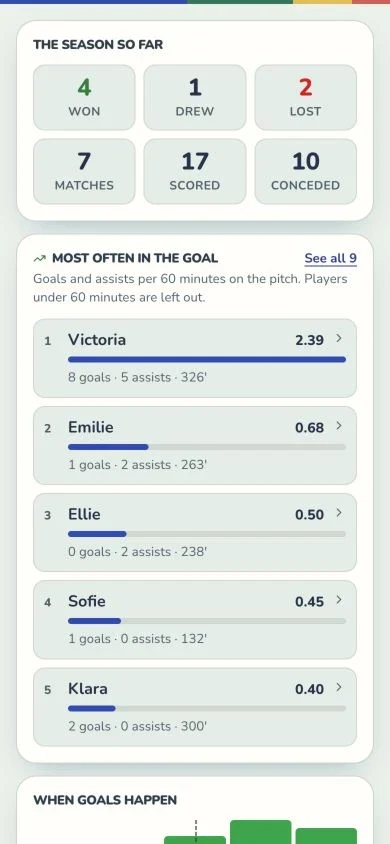
And above it, the list nobody keeps and everybody should: every player ranked by how much of the football on offer they actually got — smallest share first. The child at the top of that list is the one to start on Saturday, and you did not have to remember anything to know it.

It is a share rather than a total on purpose. A player who joined in March, or who missed a month, is measured only against the matches she was in the squad for — and a child who limps off after twelve minutes is measured against the twelve she could have had, not the fifty she could not. Mark the injury and the arithmetic stays honest.

Beside it, the season’s minutes spread across positions, with how many different players have ever stood in each. A position only one child has ever filled is the one to rotate next, and the app says so.

Share of the minutes on offer in BallQuest on a phone: every player ranked by how much of the available playing time they actually got, smallest share first, each with a bar and the matches they were in the squad for.
Between the sessions

Homework, from the library you already have

You get two hours a week with them. The other five days decide most of it, and “practise your weak foot” is not something a nine-year-old can act on.

So point at a drill instead. It turns up at the top of the child’s own home screen, under “from your coach”, with your one line about why — and one tap puts it on today’s plan, worth the same XP as anything else they train.

They get the board, the steps and the coaching points already written for a nine-year-old, in their own language. Nothing is authored twice: it is the same drill library the child already trains from.

It reaches the players whose families have joined the team with the code you sent them — a place on your squad list is enough to be coached, but a child has to be signed in to be reached. And it goes to the whole squad and names nobody: something about one child is a conversation, or a note in the staff notebook below.

Setting homework in BallQuest on a phone: a search across the drill library, with the drills for the team’s own age group listed first.
Finding the next one

Ask it to go and find you a tournament

Finding a cup for an U11 side is an evening of tabs: the union’s calendar, two listing sites, a club page that has not been updated since March, and a Facebook group somebody mentioned. Everyone at every club does it separately, several times a season, for the same handful of weekends.

So say what you are after — country, region, age group, girls or boys, level, the months it has to fall in, how far you will drive — and the app goes and reads the web for you. It comes back with real tournaments: the dates, the town, the entry deadline, and a link to the page each one came from.

Add the pages you already trust and it reads every one of them from top to bottom before it searches wider — and it searches in Danish, with the words a Danish coach would use, which is most of why it finds the local stævner rather than a page of travel-tournament agencies.

One tap turns any of them into a tournament on your team, with its dates and its link kept — ready for the matches to be added to it.

It is a search, and it says so. Every result carries the page it was read off, anything the page did not actually state is marked as worked out rather than read, and if the search comes back without having read a single page it tells you that too. Nothing is ever created without you tapping. Check the source before you enter a team — a tournament is somebody’s weekend.

Finding a tournament in BallQuest on a phone: tournaments found on the web, each with its dates, its town, the age group and the entry deadline, a link to the page it came from, and a button to add it to the team.

How deep it goes

The same numbers, at three sizes.

Everything above is recomputed from each match’s own event log rather than stored as a total — so the season, one weekend and one afternoon can never disagree with each other. Which means the same depth is available at whatever size you want to look at, for the team and for one child.

The whole season

Won, drawn, lost, scored, conceded. Minutes per position and how many players have filled each. Every player ranked by minutes, by goals, by assists or by involvement per 60. And when goals arrive, for and against, in ten-minute blocks with half-time marked.

One match

Every player’s minutes in that game, split by the position they were standing in, with who started, who came on, who scored and who set it up — replayed from the log, so a substitution at 31′ moves the numbers by exactly the minutes it moved.

One tournament

A weekend in Vallensbæk is four matches that add themselves up into their own table, their own minutes count and their own scorer list — separate from the league, and without you keeping a second sheet.

One caveat, stated everywhere it applies: a match typed in on Sunday evening has no real minutes on its goals, so it is left out of the timing charts and labelled “estimated” wherever it touches a total. A chart that says which matches it is built from is honest; one that says nothing is not.

And a notebook the whole staff shares

Every player has one. What you saw on Tuesday, what to work on next, the thing you will absolutely have forgotten by Saturday — dated, signed, and readable by every coach on the team. The assistant taking Thursday gets what the head coach saw on Tuesday, instead of it leaving with the person who noticed it.

Families cannot see it in the app. That is a boundary in the software, not a loophole in the law — a parent has a right to what is recorded about their child whichever screen it sits on, so the app says so on the box you type into, and asks you to write them the way you would say them at a parents’ evening.

And the rest

The parts that save the Sunday evening.

League, cup, friendly, training match

A match knows what kind it is, so a pre-season friendly does not quietly land in the league table. A tournament is a place you make before the first match exists, and then add matches to.

Name the squad for a cup once

A tournament weekend is played by whoever could travel. Pick them once on the tournament itself, and every match you add inside it can only choose from that list — rather than re-picking the same fifteen four times and finding the sixteenth in one of them by accident.

The club’s own details, editable

A club founded with a typo in its name kept the typo. Team info holds the name, the age group and the season, the club’s name and crest, and the coaches on the team — all in the one place, and the name and crest follow every team you run at that club.

Or log it afterwards, in a minute

Not every match gets run from the phone. The other way starts with everyone on the full match and asks you to correct only the ones who played less — which is the fastest honest way to record a game you have already played.

More than one coach

A team holds several coaches, and they see the same squad and the same matches. The assistant who ran Saturday can enter Saturday.

Hand a match to a team assistant

You cannot watch the game and the phone at the same time. Put a grown-up on the team as an assistant and give them one match: they get the same touchline console you do, and both phones show the same match as it happens — you glance down and the substitution is already there. They are not a coach. They see that match and the squad list it needs, and nothing else on the team.

Families join their own place

Send the squad a code. A family links their child to the place you already made for them, and the positions you set are the positions the child sees in their own app.

No licence, no laptop, no signal

It installs to the home screen and keeps working on a pitch with no bars. There is no club account to buy, no admin to appoint, and nothing to set up before Saturday.

What is not built yet

Planning the training year

Homework is the small version of a much bigger thing, and the bigger thing is next: sessions planned across a whole season rather than a week at a time, and a team library of session drills sitting on the same foundation as the one already here — so a Tuesday in March is something you pick rather than something you invent at 17:40.

Sparring on the position they play

A winger works on things a centre back never will, and "practise at home" is not advice. So the next piece is individual training per position — the seven a coaching conversation actually happens at: keeper, centre back, full back, central midfield, attacking midfield, winger, striker.

Two halves of it. A set of drills for each position, written for the age they are. And Kicksy, the app’s AI coach, to talk a session through with — what to work on with this player, this month, given where she actually plays.

The way in is already in the app: put a player on the position board and her own page lists the positions she is being trained for. The panels are there and say plainly that they are under construction, because we would rather you saw the shape and told us it was wrong than found it finished and unusable.

Seeing what they train at home

Homework goes out. Nothing comes back. You can point the squad at a drill and every family sees it — but the app will not tell you who did it, how often, or for how long, and no screen on the coach side shows a child’s own training log.

That one has to be built carefully rather than quickly: a child’s training belongs to their household, so the switch that would ever allow it sits with the family, off, and nothing reads it yet.

Both are here because we would rather build them with coaches than for them. Tell us what you would actually use, and it changes the order things get made in.

We are coaches too

BallQuest is made by UEFA-licensed coaches who train children at a high level every week. The drills are not scraped from the internet — they are graded year by year the way we would actually stage them, and the language is written for the child, not for the coach reading over their shoulder.

The coach side exists for the same reason. Minutes, rotation and who is quietly getting less football than the rest are the things a season buries — so the app keeps them where you can see them, and leaves the football to you.

Free to use

Take the warm-up with you on Saturday.

A finished match-day routine, drawn on the same tactics boards the app uses. Print it for the folder, or open it on a phone at the side of the pitch. No account, no email, nothing to fill in.

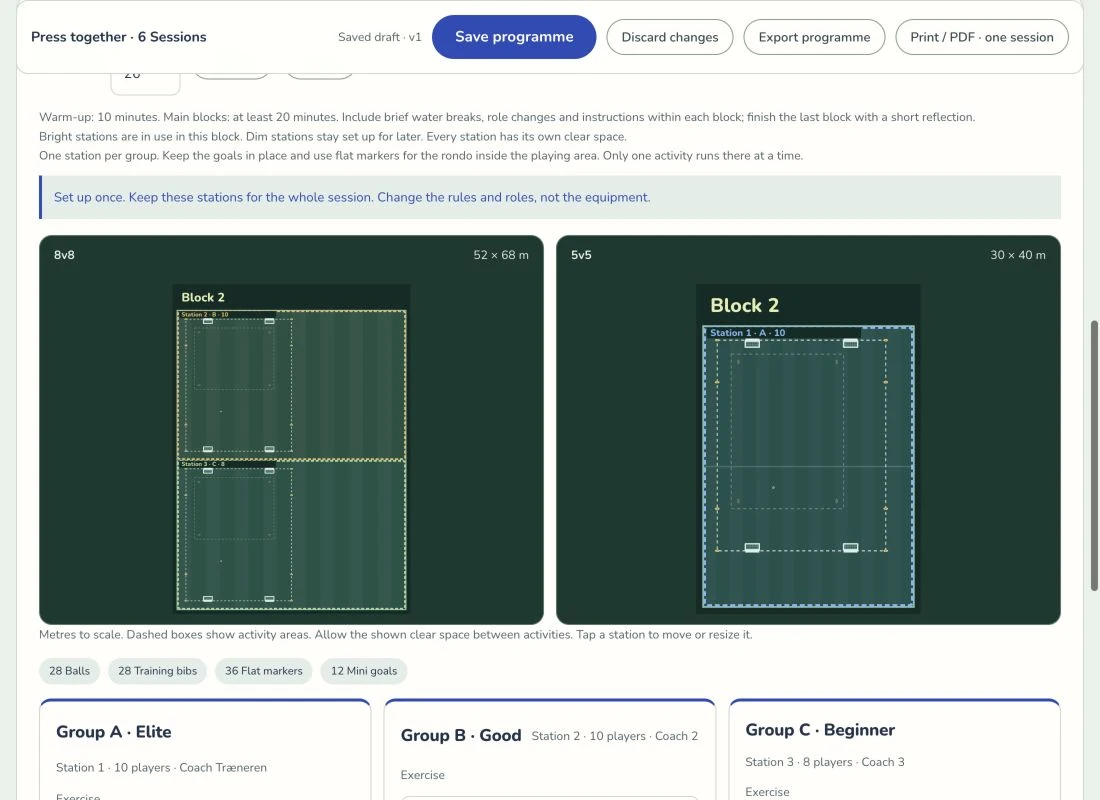
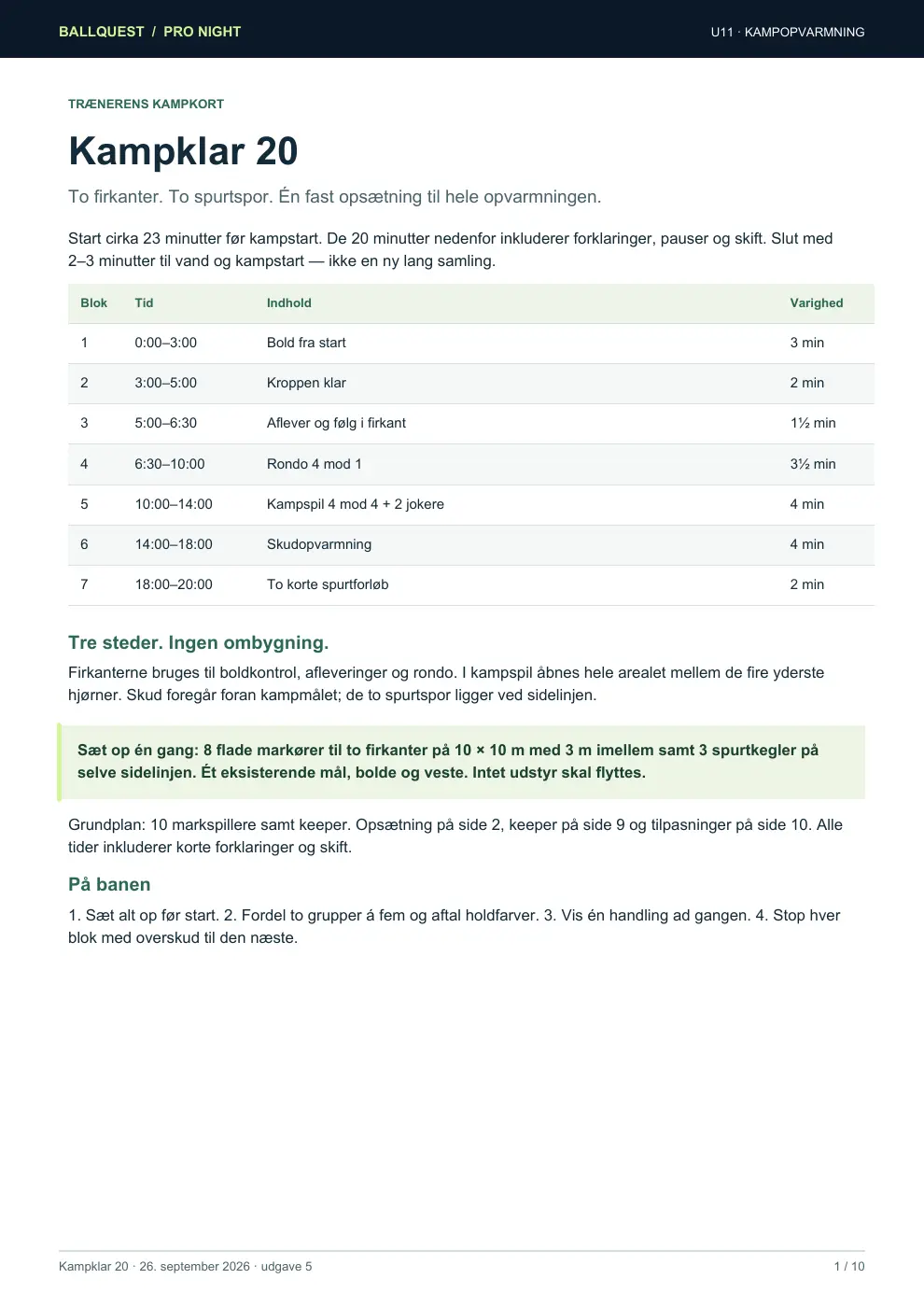
The first page of the Kampklar 20 manual: the twenty minutes as a list of seven blocks, the countdown to kick-off, and the pitch set-up drawn as a tactics board.

U11 · 8-a-side · in Danish

Kampklar 20

Twenty minutes, seven blocks, the same order every match. One 20 × 15 m grid you set up once and never move a cone in, a tactics board for every block, the words to say to the players written out — and a plan for the Saturday where the match before overruns and you have ten minutes left.

  • A board for every block
  • What to say, word for word
  • 10- and 5-minute versions
  • A goalkeeper card a parent can run

Download the PDF 18 pages · 2.0 MBOr read it on a phone

Yours to keep: put it in the club folder, on the club’s own website, or in the coaches’ group chat. We only ask that the BallQuest name stays on it.

Questions

The ones a coach asks first.

Can I use it with my team right now?

Yes. Make an account, create the team, type the squad in, and log Saturday’s match. That part is finished and free — the screenshots on this page are the app, not a plan.

Would I see my players’ home training?

No. You can send drills the other way — pick them from the library and every family sees them — but nothing comes back. A child’s training log belongs to the household, and no screen on the coach side shows it. There is an opt-in for families who may want to share their minutes one day; it is off by default and nothing reads it yet.

Can somebody else keep the match while I coach?

Yes. Add them to the team as a match assistant — they need the app and an account, nothing more — and then give them a match at a time. Inside that match they can do everything you can, and you both see it live from your own phones. Being on the team gets them the squad list; it does not get them the next match, your notes about a player, or the power to add anybody. You can take a match back at any point, including while it is being played.

Can I write things down about a player?

Yes — every player has a notebook that all the coaches on the team share, so what you saw on Tuesday is there for whoever takes Thursday. It is not shown to families in the app, but a parent is entitled to what is recorded about their child, so write them the way you would say them out loud.

What do you store about the children on my squad list?

A name, a shirt number, a birth year and their positions. Not a birthday, not a photo, not an address — a squad list needs an age group, not a date, and the smaller version is the one that cannot hurt anybody.

Will it cost the club money?

There is no club price and no per-seat licence. If that ever changes it will be the family price handled sensibly, not a sales call.

What the player’s side of the app does is on the features page.

BallQuest is not open yet.

Want to be one of the first teams?

Leave your address and we will write to you once — properly — when the coach side opens to clubs. Reply to that mail and you get a person, not a form.